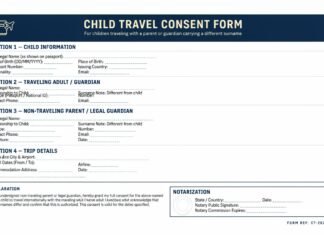

Creating a muvafakatname used to mean opening a blank document and starting from zero. Today, that process is much easier. You can draft the text online, edit details on any device, convert the file into PDF, insert a signature, and send it within minutes. That convenience is exactly why so many people now search for the best online tools muvafakatname users can rely on.
But convenience alone is not enough. A muvafakatname often contains sensitive personal details such as names, passport numbers, addresses, travel dates, and guardian information. That means the best platform is not simply the one with the nicest interface. It should also be practical, readable, and safe for handling personal documents.
This guide explains which types of tools are most useful, what each one does best, and how to choose the right platform depending on whether you are drafting, converting, signing, emailing, or reviewing your document.
What Makes a Good Online Tool for Muvafakatname Use?
Not every document platform is suitable for legal or travel-related paperwork. The best online tools muvafakatname users should look for usually offer a combination of the following:
- easy text editing
- clean template handling
- PDF conversion
- mobile-friendly access
- electronic signature support
- clear download options
- safe file storage or secure sharing options
Some tools are better for drafting. Others are better for signing or formatting. That is why the smartest approach is usually not to depend on one platform for everything. Instead, choose the right tool for the stage you are in.
1. Google Docs for Fast Drafting and Easy Editing
Google Docs is one of the most practical choices for early drafting. It is simple, accessible, and easy to use on both desktop and mobile devices. If your goal is to create the first version of a consent letter, this is often one of the strongest online tools muvafakatname users can start with.
Why it works well:
- easy to write and edit from anywhere
- supports templates and reusable document structure
- lets you collaborate with a family member or consultant
- easy to export into Word or PDF later
Google Docs is especially useful when the document still needs revisions. It is not always the final step, but it is often the most convenient place to begin.
2. Microsoft Word Online for Familiar Formatting
Some people prefer Word because they already know how it works. If you are comfortable with Microsoft’s interface, Word Online is another strong option among online tools muvafakatname users can use for drafting and formatting.
It is helpful when:
- you want a more traditional document layout
- you already have a DOCX template
- you need fine control over spacing and page structure
- you plan to share the editable file with others
Word Online works well for people who want the flexibility of Word without being tied to one device. It is especially useful if the document may need formal styling before being converted to PDF.
3. Adobe Acrobat Online for PDF Editing and Fill & Sign
Once the wording is final, many people want to move into PDF format. This is where Adobe Acrobat online tools become especially useful. Among the most practical online tools muvafakatname users can choose, Adobe is strong when the goal is to preserve layout, fill fields, or sign a PDF cleanly.
Adobe is useful for:
- editing a PDF directly in the browser
- adding text to fixed forms
- filling and signing a completed document
- keeping the final layout stable for printing or submission
If your muvafakatname is already drafted and only needs finishing touches, Adobe Acrobat online tools are often a practical next step.
4. Smallpdf for Quick Conversion and Simple PDF Work
Smallpdf is popular because it makes common PDF tasks easy. It is often chosen by users who want speed rather than complexity. For many everyday tasks, it belongs on any shortlist of online tools muvafakatname users may find helpful.
It is useful for:
- converting Word files into PDF
- editing and reorganizing PDF pages
- adding signatures or text
- compressing files before email or upload
This can be especially practical when a document must be shared quickly and the file size needs to stay manageable.
5. DocuSign for Structured Signature Workflows
Not every muvafakatname needs full e-signature workflow support, but in some cases it can be very helpful. DocuSign is often better suited to users who need a cleaner signature process, especially where more than one person must review or sign the document.
Among online tools muvafakatname users may consider, DocuSign stands out when the workflow matters as much as the file itself.
It is useful for:
- requesting signatures from another person
- keeping the signature process organized
- using reusable templates
- tracking status more formally than simple email attachment exchange
This kind of tool is more helpful in structured legal or administrative settings than in casual one-person drafting.
Which Tool Is Best for Which Stage?
The best answer depends on the stage of your document process.
- Drafting stage: Google Docs or Word Online
- Formatting stage: Word Online or Google Docs
- PDF conversion stage: Adobe Acrobat online or Smallpdf
- Signing stage: Adobe Acrobat online or DocuSign
- Final sharing stage: PDF-ready tools plus secure email handling
This is the most practical way to think about online tools muvafakatname users often compare. The best tool is not universal. It depends on what you need to do next.
Should You Use a Template Tool or Start From Scratch?
If you already understand the structure of the document, starting from a blank draft can work well. But many users prefer a prepared base because it reduces the risk of forgetting important sections. That is where templates become useful.
A template is especially helpful when:
- you are creating the document for the first time
- you want a cleaner structure
- you need a faster starting point
- you want consistency across multiple drafts
Before choosing among the available online tools muvafakatname users should also review a reliable starting structure. A helpful first step is reviewing a muvafakatname template so that the wording and sections are complete before you begin editing online.
Privacy Matters More Than People Think
A muvafakatname can include highly sensitive personal information. That means users should not upload the file carelessly to any unknown website. Even if a platform looks convenient, privacy and security should be considered before using it.
Good habits include:
- using well-known platforms
- avoiding suspicious or unverified sites
- removing unnecessary personal data from drafts
- downloading the final file and deleting unused uploads where possible
- protecting your email and cloud account with strong security settings
This is one of the most important points in any discussion of online tools muvafakatname users should keep in mind. The best tool is not just easy. It should also be used responsibly.
What About Verification After Generation?
Generating the document online is only one step. You still need to check whether the names, dates, passport details, destination, and wording are accurate. If the document will be used formally, it may also need signature, notarization, translation, or supporting identification documents.
That is why users should not confuse document generation with legal readiness. After using any of the online tools muvafakatname users should verify the final content carefully. For the next stage, it may help to review how to verify a muvafakatname online before relying on the file for official use.
Sending the Final File the Right Way
Once the document is complete, the next challenge is delivery. A well-drafted file still needs to reach the right person in a readable format. That usually means PDF. Sending editable drafts too early can create confusion, especially if multiple people start changing the file.
After using any of the common online tools muvafakatname users should usually save the final version as PDF before sending it. If email is the chosen method, it helps to review how to send a muvafakatname by email so the file is shared more professionally and with fewer mistakes.
Common Mistakes When Using Online Tools
- choosing a tool only because it is free, without checking reliability
- uploading sensitive data to an unknown website
- forgetting to export the final file into PDF
- sending an editable draft instead of the final version
- using a template without checking whether the wording fits the real situation
- assuming online generation means the document is automatically legally complete
Most problems do not come from the tools themselves. They come from rushing through the process without reviewing the final output properly.
Best Practical Choice for Most Users
For most people, the easiest workflow looks like this:
- draft in Google Docs or Word Online
- review and correct all legal and travel details
- convert to PDF using Adobe Acrobat online or Smallpdf
- sign using Adobe or DocuSign if appropriate
- send the final PDF by email or print it for signing and notarization
This combination usually gives the best balance of speed, clarity, and control. It is also the most practical way to use online tools muvafakatname users commonly need without making the process more complicated than necessary.
Final Thoughts
The best online tool to generate a muvafakatname depends on what you need most. If you are drafting, choose a flexible editor like Google Docs or Word Online. If you are formatting and finalizing, use PDF-focused tools like Adobe Acrobat online or Smallpdf. If signature workflow matters, DocuSign can be useful. No matter which platform you use, accuracy and privacy should always come first.
In the end, the smartest approach is not just finding one tool. It is building a clean workflow from draft to final PDF. That is the real value of choosing the right online tools muvafakatname users can trust.
For official guidance on protecting sensitive personal information when handling documents online, see this FTC data protection guide. For additional supporting information on browser-based PDF editing and signing, see this Adobe PDF editor overview.